



Skip to content
Bridge home

The coordination layer modern universities are missing

Students get confused. Professors answer the same question twenty times. Bridge closes the gap — without replacing the tools your school already uses.

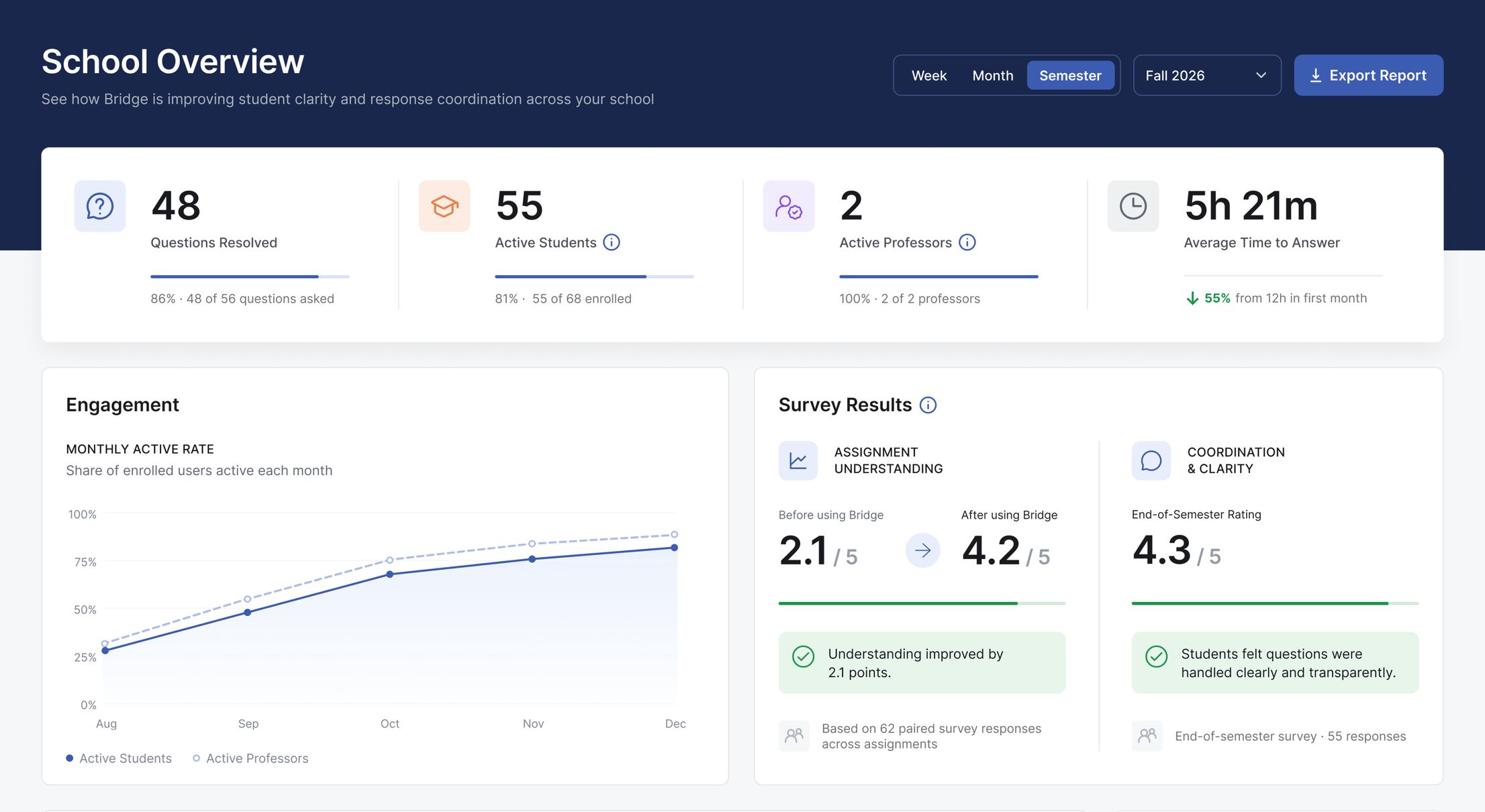
The Bridge School Overview dashboard: questions resolved, active students and professors, average time to answer, a monthly engagement chart and before-and-after survey results.

Bridge pilot programme now open

Built for online and hybrid universities

  • Moodle
  • Canvas
  • Blackboard

The problem

Questions get lost between the brief and the answer

A student opens an assignment brief and hits something they don't understand. With no clear place to ask, the question goes unanswered — and they submit weaker work than they're capable of, or nothing at all. Meanwhile, the professor answers the same question over and over by email. It isn't a content problem. It's a coordination problem — and no one is solving it.

The solution

Keep every question connected to the brief

Bridge gives students a clear place to ask questions directly within an assignment brief. They select the relevant text, submit their question in context, and receive the professor's response beside the section it relates to—making guidance easier to find, follow, and understand.

How Bridge works

From question to clarity in three simple steps

  1. Open an assignment brief

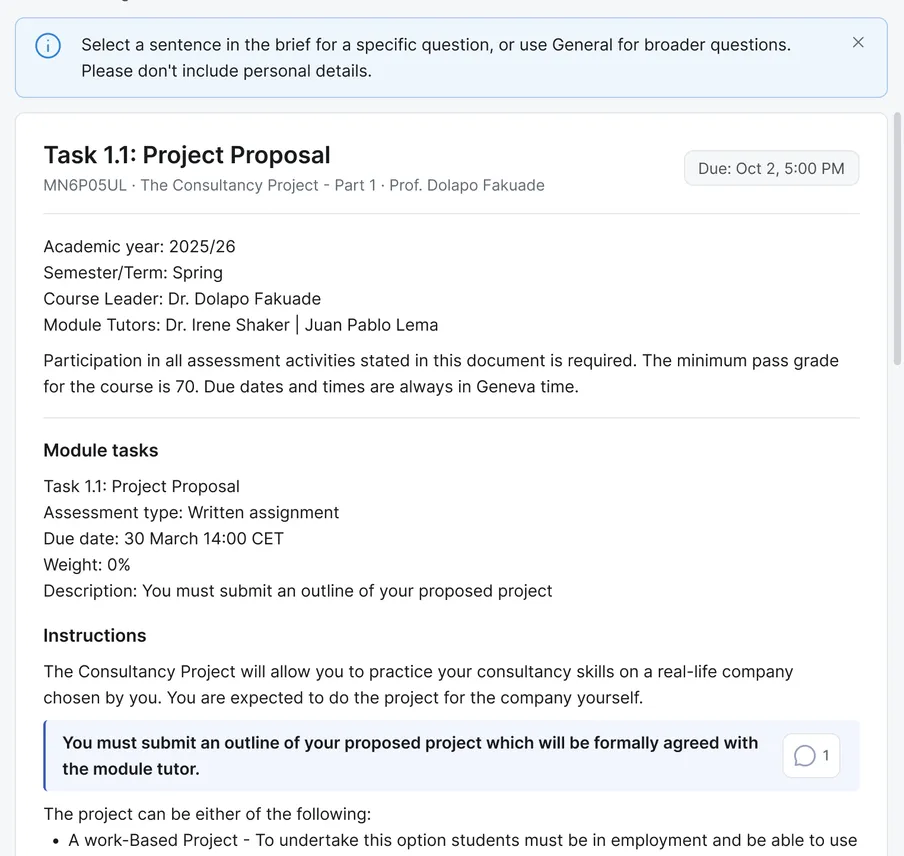
    The student opens their assignment and sees the full brief with all details.

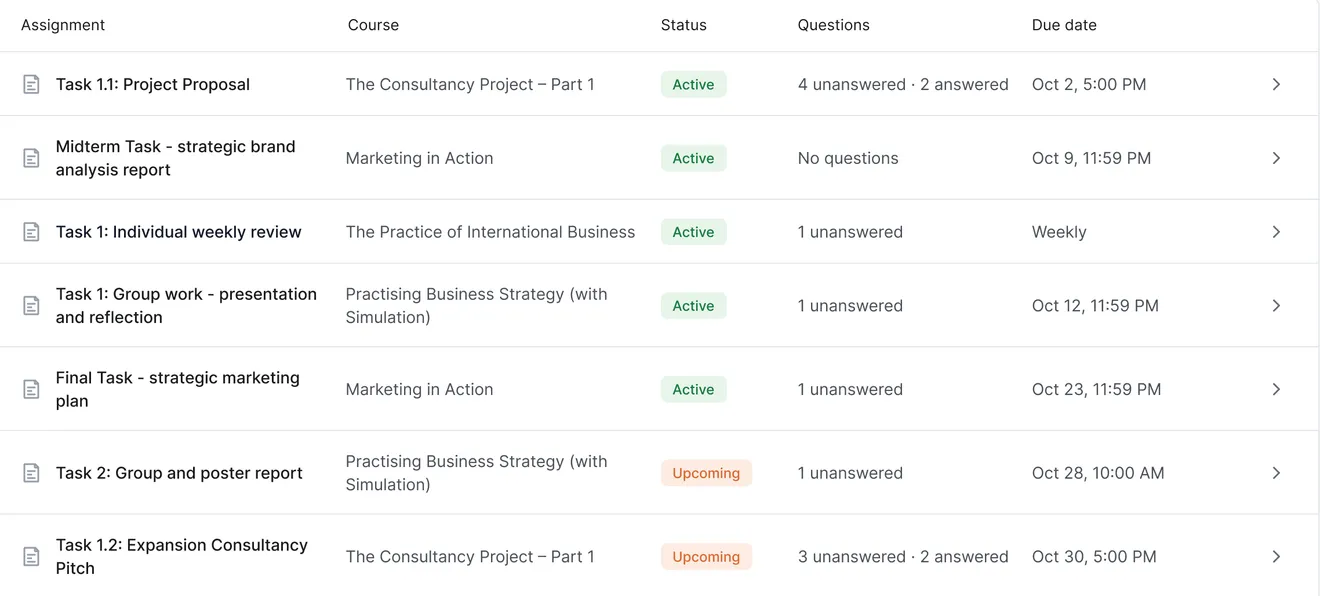
    A student's assignment list in Bridge: each assignment with its course, status, open questions and due date.The brief for Task 1.1: Project Proposal open in Bridge, with a prompt to select a sentence and ask about it.
  2. Select text and ask a question

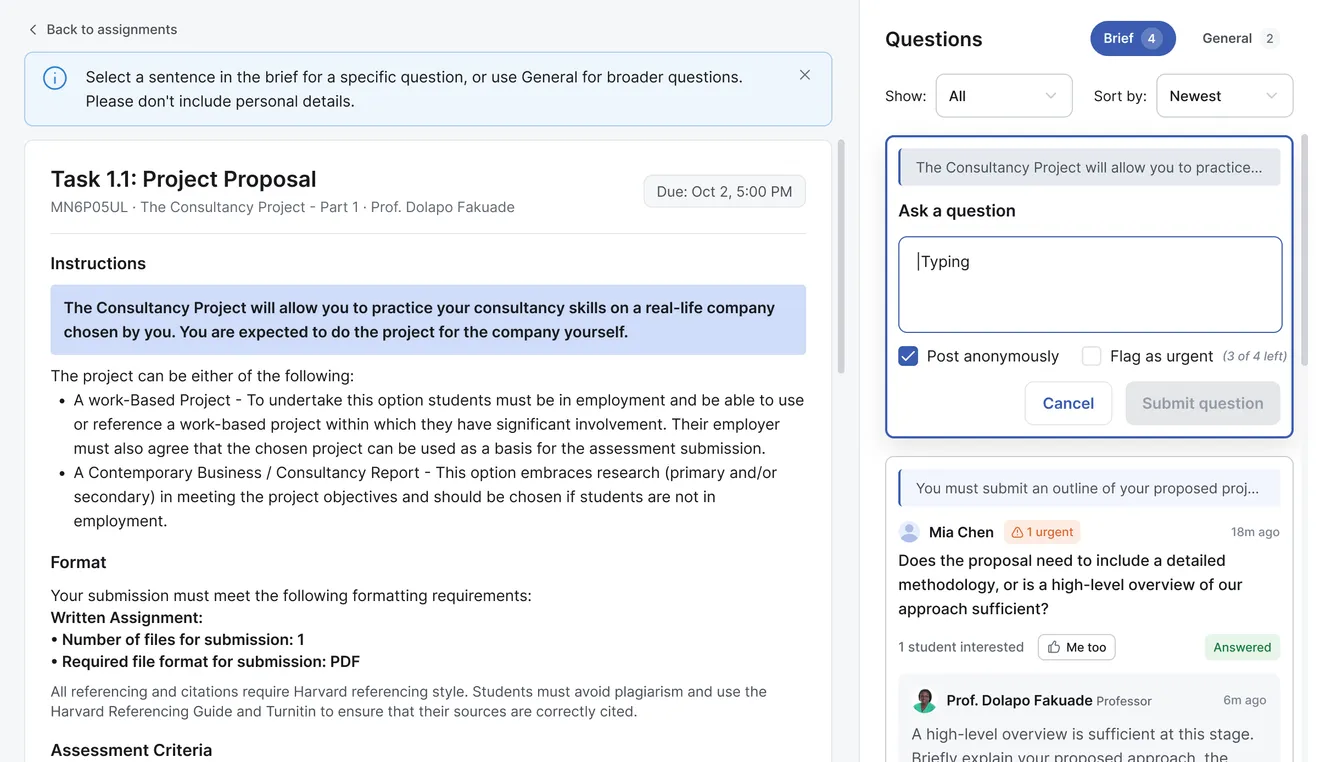
    Highlight a relevant sentence and submit a question. Other students can follow it.

    A sentence in the brief highlighted, with the Ask a question panel open beside it and options to post anonymously or flag the question as urgent.
  3. Receive the professor's answer

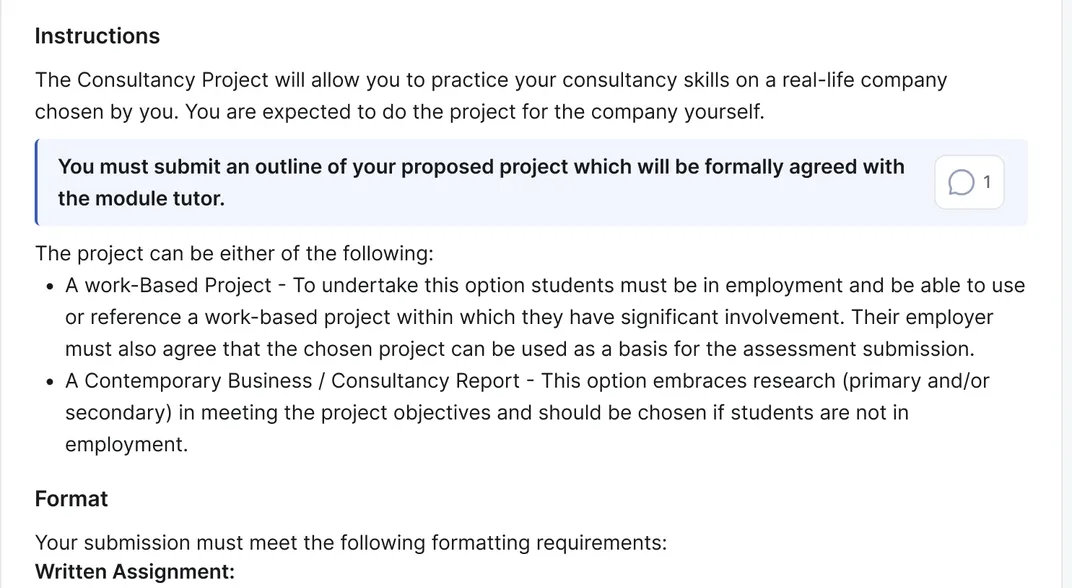
    The professor reviews and answers. The response appears right next to the relevant text.

    The brief's instructions, with one highlighted requirement marked as having a question.
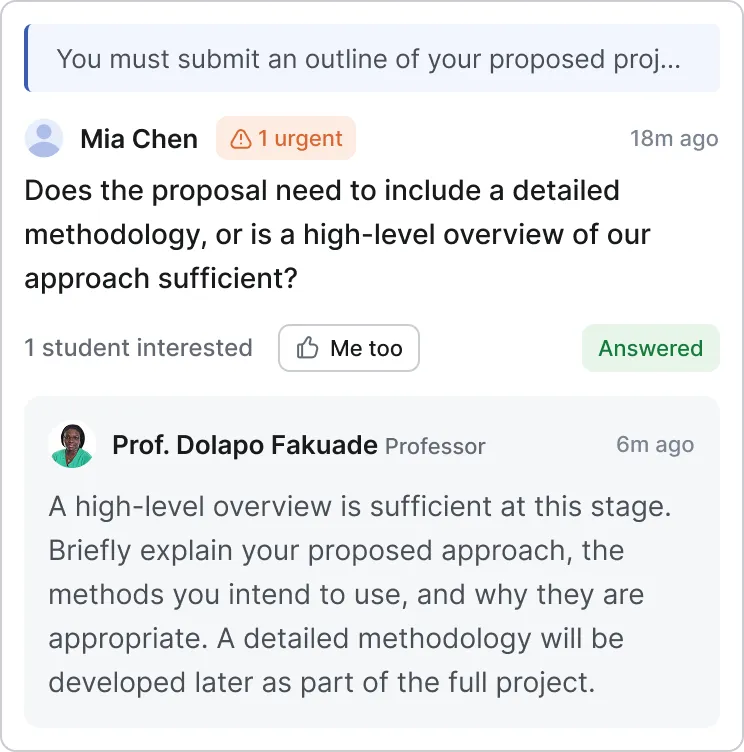
    A student's question about that requirement, answered by Prof. Dolapo Fakuade directly beneath it.

How it fits

Works alongside what you already use

Bridge works alongside your existing LMS — nothing gets ripped out or replaced. It gives students and professors a clearer place to ask questions, share answers, and stay aligned.

Students & professors

Bridge

Communication & clarity

Tools your school already uses

Moodle · Canvas · Blackboard

What Bridge does and does not do

Bridge handles the coordination.
The teaching stays human. It keeps student questions and professor responses connected to the relevant assignment brief—but it never generates answers, writes assignments, or completes students' work for them.

Product benefits

Better communication, better outcomes

See clearer communication

Compare student understanding and coordination across the semester

Survey Results

Assignment Understanding

Before using Bridge2.1/ 5

After using Bridge4.2/ 5

Understanding improved by 2.1 points.

Coordination & Clarity

End-of-Semester Rating4.3/ 5

Students felt questions were handled clearly and transparently.

Track engagement over time

See how student and professor participation changes throughout the semester.

Monthly active rateShare of enrolled users active each month
Monthly active rate: share of enrolled users active each month, in percent
MonthActive studentsActive professors
Aug28%32%
Sep48%55%
Oct68%75%
Nov76%84%
Dec82%89%

Course performance at a glance

Review resolved questions, active students, “Me too” responses, and average response time for an individual course.

Course-level view · The Consultancy Project — Part 1

  • 27Questions Resolved

    87% · 27 of 31 questions asked

  • 43Active Students

    80% · 43 of 54 enrolled

  • 82“Me too” responses

    Across 31 questions

  • 4h 18mAverage Time to Answer

    64% from 12h in first month

Frequently Asked Questions

Got questions?
We have answers

Here are the most common questions about Bridge, how it fits alongside your existing tools, and what to expect during onboarding.

No. Bridge doesn’t grade, score, or track participation for marks. Asking questions is always safe — never a performance.

Students can ask anonymously. An anonymous question hides the author’s name from other students; the course’s professors and your institution’s administrators can still see who asked, so they can follow up.

No. Every answer comes from a professor. AI is used only if your administrators choose to, to help structure an imported assignment brief — never to answer students.

No. Bridge works alongside Moodle, Canvas, Blackboard or whatever your institution already uses. Nothing gets ripped out or replaced.

Your institution’s administrator invites students by e-mail. They sign in with a one-time link sent to that address — there is no password to remember.

On Amazon Web Services servers in Frankfurt, Germany.

Less confusion.
Fewer emails.
Better learning.

See how Bridge works for your courses.

Request a demo

Tell us about your institution and we will get back to you within two working days.

We use these details only to arrange your demo. See our privacy notice.